When a colleague takes over a plan, you can transfer the plandisc to them. They become the new owner, and the plandisc moves to their account right away.
Before you start
- Only the owner can transfer a plandisc. If you don’t see Transfer in the menu, you’re not the owner. Collaborators can’t transfer a plandisc, even with admin rights on it.
- The new owner needs a Plandisc license. They don’t need to be on the same license as you.
- A transfer can’t be undone. Once you transfer a plandisc, you no longer have access to it.
Tip: Want to keep a version for yourself? Copy the plandisc first, then transfer the original. See Copy a plandisc.
Transfer a plandisc
- Open the plandisc you want to transfer. You can find it on your Dashboard or under My plandiscs in the left menu.
- At the top of the left panel, click the three dots (...) next to Export and Share.
- Click Transfer.
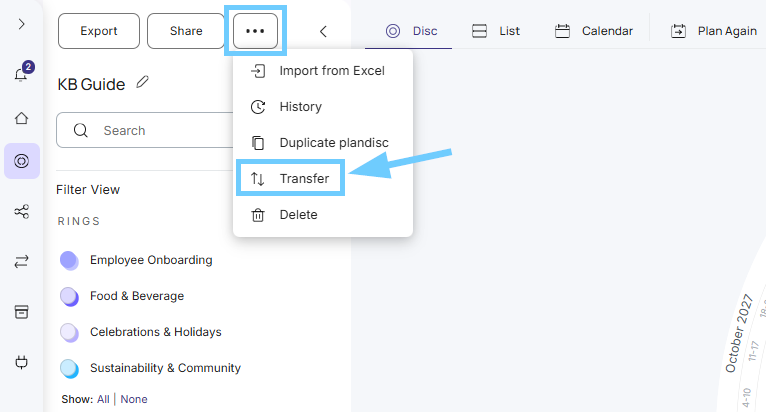
- The Transfer Plandisc dialog opens.
- Enter the email address of the user you want to transfer the plandisc to.
- Review the options under Before you proceed. The options you see depend on your plandisc:
- Remove collaborators: appears if the plandisc is shared with collaborators. It’s on by default, so the new owner starts with no collaborators. Turn it off if the same people should keep their access.
- Remove activities attendees: appears if the plandisc’s activities have attendees. It’s on by default, so the attendees are removed from all activities. Turn it off if the new owner should keep the same attendees.
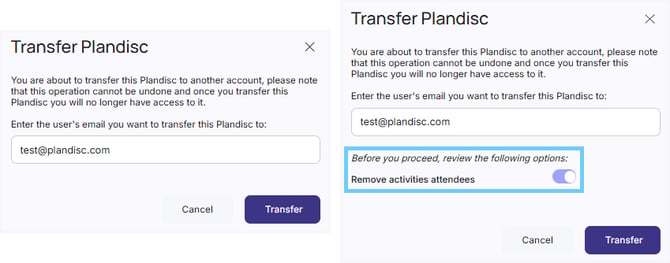
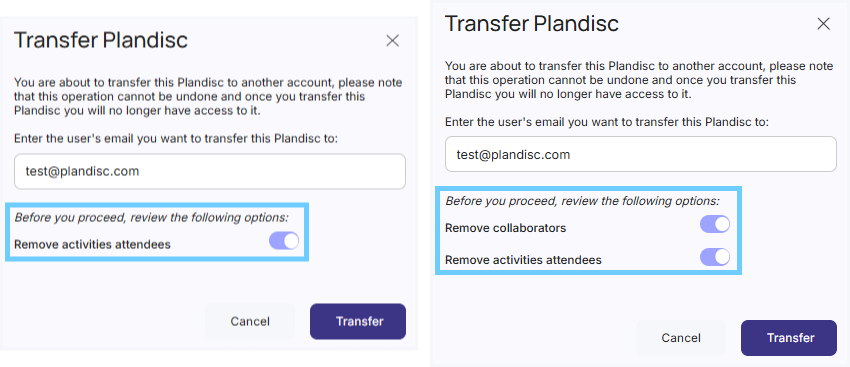
- Click Transfer.
The plandisc now belongs to the new owner.
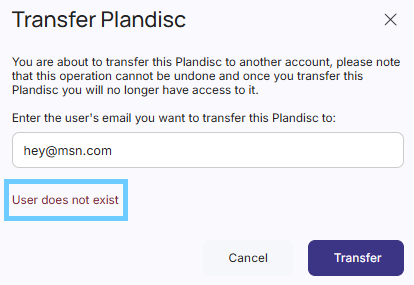
Seeing “User does not exist”?
This message means the email address doesn’t belong to a Plandisc user. Check the spelling, or ask the person which email they use to log in to Plandisc. If they don’t have a Plandisc license, they need one before you can transfer the plandisc to them.