
When someone leaves your organization or no longer needs Plandisc, you can remove them from your Enterprise license. This frees up their seat for someone else. If they own plandiscs, you can move those plandiscs to your own account first, so no plans get lost.
Note: Only admins can remove users.
Before you start
Removing a user takes them off the license and blocks their account. They can no longer log in to Plandisc with that account.
Adding the same person again later doesn’t bring their plandiscs back. So if you want to keep their plandiscs, transfer them when you remove the user.
Remove a user
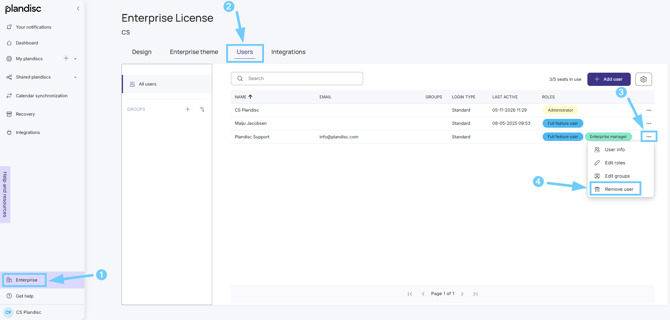
- In the left menu, click Enterprise.
- Open the Users tab.
- Find the user you want to remove. Click the three dots (...) at the end of their row.
- Click Remove user.
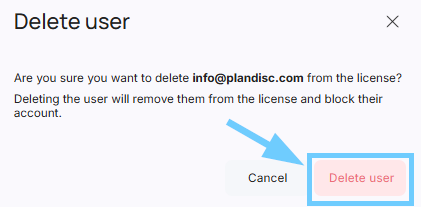
A Delete user dialog opens. What you see next depends on whether the user owns any plandiscs.
If the user doesn’t own any plandiscs
The dialog asks you to confirm. There’s nothing to transfer.
- Click Delete user.
If the user owns plandiscs
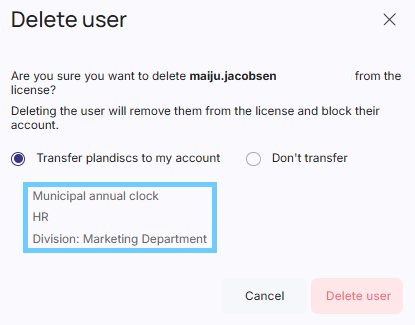
The dialog lists the plandiscs the user owns (marked in blue in the image below) , plus two options:
- Transfer plandiscs to my account: the plandiscs move to you, and you become the owner. This option is selected by default.
- Don’t transfer: the plandiscs stay with the removed user’s account, and you can’t open them.
- Choose an option.
- Click Delete user.
The user is removed, and the seat count at the top of the Users tab goes down by one (for example, from 3/5 to 2/5 seats in use).
Changed your mind? You have 90 days
We keep a removed user’s data, including their plandiscs, for 90 days. If you need something back within that time, contact Plandisc Support at info@plandisc.com and we’ll help you get it back.
After 90 days, the data is deleted for good and we can’t get it back.
Give the plandiscs to a new owner
If you transferred the plandiscs to your account, you can hand them over to a new owner later. This is useful when a colleague takes over the departing person’s work.