
Want to check your plan, switch to a different one, or update your payment details? You can do it all from your subscription settings.
Open your subscription settings
- Log in to Plandisc.
- Go to your dashboard.
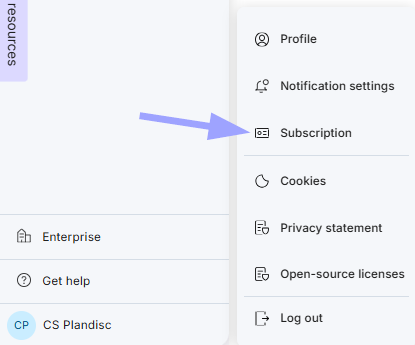
- Click your name in the bottom left corner.
- Click "Subscription."
What you'll find here
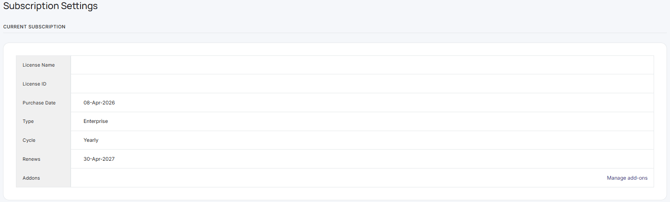
- Your current plan: See your license name, license ID, purchase date, subscription type, billing cycle, and renewal date.
- Add-ons: Click "Manage addons" to add or remove extra features on your license.
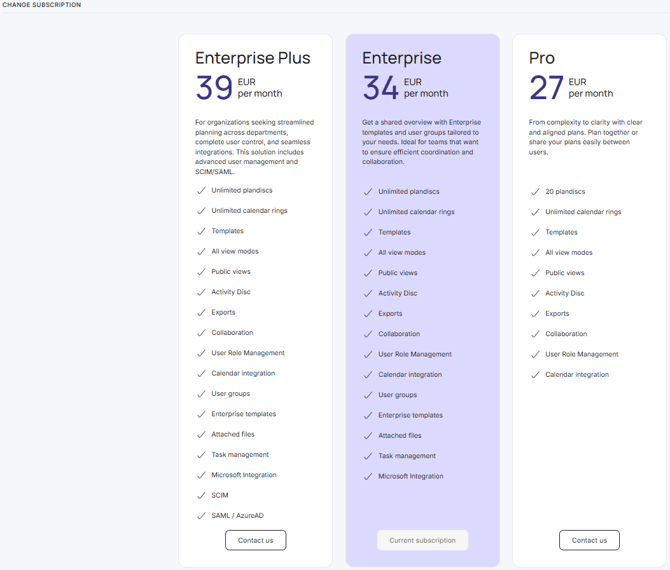
- Other plans: Compare Enterprise Plus, Enterprise and Pro side by side, and see what's included in each.
- Change your plan: Click "Contact us" on the plan you want, and our team will help you switch.
- Payment method: Click "Change payment method" to add or update your card.
