
Every public sector planning season starts with the same promise: this year we will get ahead of it. This year, someone will know where all the compliance deadlines are before the audit window opens. This year, HR and Finance will not discover at the last minute that they are competing for the same approval queue during the same two weeks. That promise is hard to keep when your annual planning lives across eleven different spreadsheets, three shared drives, and a wall calendar in a meeting room that half your team has stopped checking.
A visual annual planning calendar replaces that fragmented picture with one shared overview of the full year. The right one can mean the difference between spending your week chasing updates across disconnected systems and having a single view that shows exactly where every department stands.
This guide walks you through everything you need to evaluate visual annual planning calendars for public sector organisations: the features that actually matter, the questions you should ask before signing, and the trade-offs between different approaches.
TL;DR Public sector planning fails most often not because of bad intentions but because annual activities are spread across disconnected systems with no single shared view. A visual annual planning calendar fixes this by displaying the full year in one overview, with cross-department deadlines, compliance milestones, and ownership all visible at once. When evaluating options, the features that matter most for public sector use are a full-year view, role-based permission controls, audit trails, Microsoft 365 integration, and confirmed EU data residency. This guide covers how to assess each of those, compare the main calendar formats, and run a selection process that results in a tool your organisation will actually adopt.
What Is a Visual Annual Planning Calendar?
A visual annual planning calendar is a tool that displays your organisation's full year of activities, deadlines, and responsibilities in one visual format. Unlike standard calendars that show a week or month at a time, these tools let you see the bigger picture.
The difference is significant in practice. When you can see the whole year, patterns emerge. You notice when three major initiatives land in the same quarter. You spot the gaps where nothing is scheduled but probably should be. You see how your Q1 activities connect to Q4 outcomes before you are already in Q4.
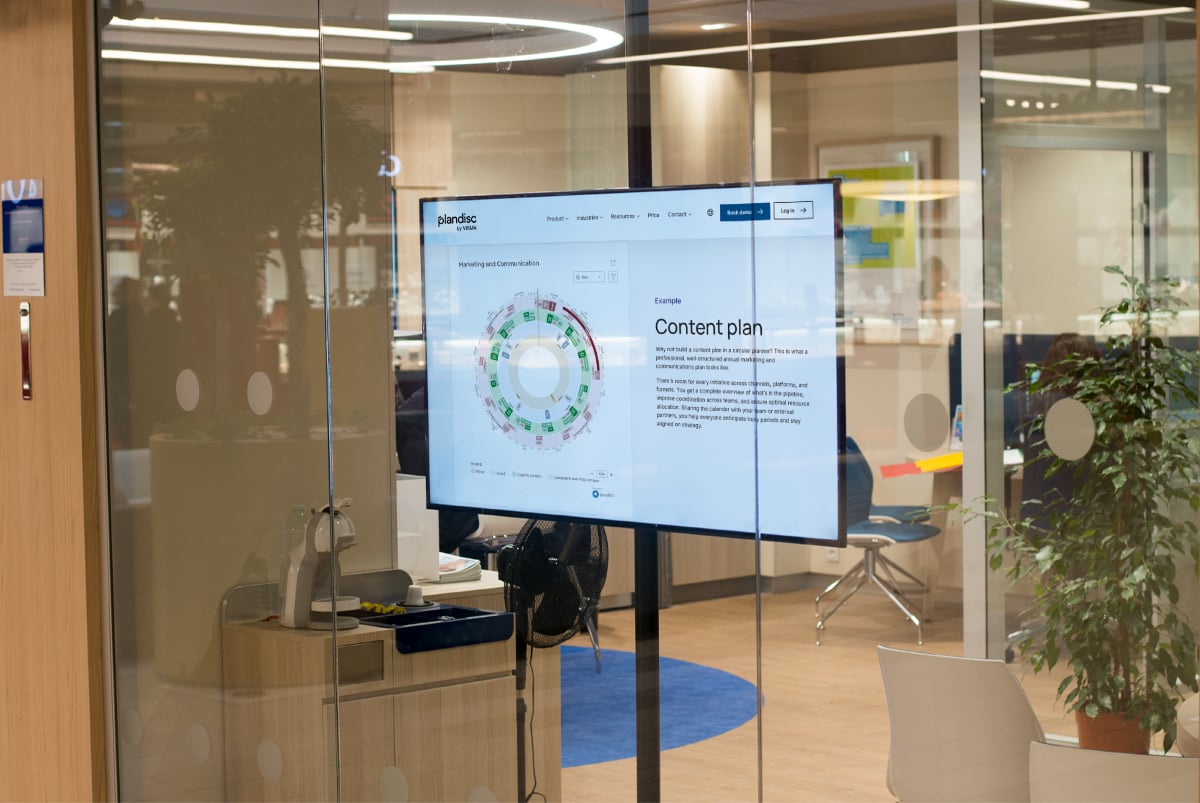
In Plandisc, a visual annual planning calendar takes the form of a digital year wheel (also called an årshjul): a circular view of the full year, with concentric rings representing different departments, activity types, or strategic themes. The ring structure makes it possible to see everything at once without it becoming unreadable.
Why Traditional Calendars Fall Short for Public Sector Planning
Standard calendars, whether it is Outlook, Google Calendar, or a wall planner, are designed for short-term scheduling. They are built around days, weeks, and months. That works for meetings and personal appointments.
Public sector annual planning operates on longer cycles. You are tracking budget cycles, compliance deadlines, strategic initiatives, and recurring governance activities simultaneously. A monthly view does not show you how your Q1 activities connect to your Q4 outcomes.
When planning spans fiscal years and involves multiple departments, you need something that shows the full cycle. Without it, you end up with the familiar pattern: everyone maintains their own spreadsheet, no two versions match, and coordination happens through endless email chains. There is no single authoritative picture of the year, so nobody fully trusts any version of it.
Why Public Sector Organisations Need Specialised Planning Tools
Public sector organisations are not just larger versions of private companies. The governance structures, accountability requirements, and stakeholder complexity create planning challenges that generic project management tools do not address.
Governance and Accountability Requirements
Every activity in the public sector has someone responsible for it, and often multiple layers of oversight above them. Your planning tool needs to reflect this reality.
You need to assign clear ownership to activities. You need permission structures that match your organisational hierarchy. And you need audit trails that show who changed what and when. These are not optional extras. They are requirements for public accountability.
Cross-Departmental Coordination Challenges
Here is a scenario you probably recognise: HR is planning a major recruitment drive. Finance is closing the books for Q2. Communications is launching a public engagement campaign. Nobody realised all three would need the same conference room, the same IT support, and the same executive approvals during the same two weeks.
When departments plan in isolation, conflicts like this do not surface until it is too late. Research by Behnam Tabrizi, published in Harvard Business Review, found that nearly 75 percent of cross-functional teams are dysfunctional, failing on criteria including staying on schedule and maintaining alignment with organisational goals. Unclear governance and lack of shared planning visibility are among the primary causes. A shared visual planning calendar makes overlaps visible before they become problems.
Compliance and Reporting Cycles
Public sector organisations operate within fixed reporting cycles: fiscal years, audit periods, regulatory deadlines. Missing these is not just inconvenient. It can have legal and political consequences.
Your planning calendar needs to accommodate these cycles and make them visible as a core organising principle, not an afterthought. When your annual overview shows the full fiscal year with all compliance milestones marked, you are less likely to get surprised by a deadline that was always there but never clearly owned.
How to Evaluate Visual Planning Calendars: Features That Matter
Not all planning tools are equal, especially when evaluating them for public sector use. Here is what to look for when comparing options.
Full-Year Visual Overview
This is non-negotiable. Your planning calendar should display the entire year in a single view. Some tools offer this as a timeline. Others, like Plandisc, use a circular year wheel that shows how the year flows as a continuous cycle.
The circular format has a specific advantage: it emphasises that annual planning is not linear. Q4 activities connect to Q1 of the next year. Recurring events come back around. When you see planning as a wheel rather than a straight line, cyclical patterns become more intuitive.
Multiple View Options
A full-year view is essential, but you will also need to zoom in. Look for tools that offer flexible visualisation: year view for strategic planning, quarter or month views for tactical work, and list views for detailed task management.
The ability to switch between views without losing context matters. Your strategic planners need to see the big picture. Your operational teams need to see their specific tasks. Everyone should be working from the same underlying data.
Collaboration Features
Annual planning is not a solo activity. Look for features that support real collaboration:
- Real-time updates so everyone sees the current version
- Comments and annotations for discussion without email chains
- Sharing options that give the right level of access to each stakeholder
- Notification systems that alert relevant people when changes happen
The goal is to eliminate the question of which version is current. When everyone works from a shared, live-updating plan, you spend less time reconciling spreadsheets and more time executing.
Governance-Ready Permission Structures
In public sector organisations, not everyone should be able to edit everything. You need permission levels that reflect your organisational structure.
Look for tools that offer role-based access control. Some team members need editing rights. Others only need to view. Some plans should be visible across the organisation; others should be restricted to specific departments.
Plandisc handles this with flexible sharing and permission settings that let you control exactly who can see and modify each planning element. This matters when you are dealing with sensitive information or need to maintain clear lines of responsibility.
Microsoft 365 Integration
Most public sector organisations in the Nordics run on Microsoft 365. Your planning tool should integrate with this existing infrastructure.
At minimum, look for Outlook calendar synchronisation. This lets individual activities flow into personal calendars without manual re-entry. Better still, look for deeper integration with Teams, SharePoint, or Power Automate that connects your planning to your daily workflows.
Plandisc integrates directly with Microsoft 365, letting you sync planning activities with Outlook calendars and embed planning views where your teams already work. No switching between separate systems means higher adoption and fewer information gaps.
Data Security and EU Residency
Data protection is not optional in the public sector. The General Data Protection Regulation (GDPR) sets strict requirements for how personal data about EU residents is stored and processed, including requirements that affect which cloud providers and hosting locations are permissible. Public sector organisations are typically held to an even higher standard than private companies, and some member states impose data residency requirements that go beyond the baseline GDPR obligations.
Before committing to any cloud-based planning tool, verify:
- Where your data is stored (EU data residency is often required)
- What security certifications the provider holds
- How access is controlled and monitored
- What happens to your data if you leave the platform
Plandisc stores all data in the EU via Microsoft Azure, with regular security testing and monitoring. For organisations bound by GDPR and public sector data handling requirements, this kind of clarity upfront saves significant headaches later.
Step-by-Step Guide: Choosing a Planning Calendar for Your Organisation
Here is a practical process for evaluating and selecting a visual annual planning calendar. Work through these steps before making your decision.
Step 1: Map Your Planning Requirements
Before you look at any tools, document what you actually need. Start with these questions:
- How many departments or teams will use this tool?
- What is your primary planning cycle (fiscal year, calendar year, academic year)?
- What governance structures need to be reflected?
- What compliance or reporting deadlines must be visible?
- What existing systems must the tool integrate with?
Write down the answers. This becomes your evaluation checklist.
Step 2: Identify Your Must-Have Features
Separate your requirements into must-haves and nice-to-haves. Be honest about this distinction. Everything might feel essential, but you need to prioritise.
Common must-haves for public sector organisations include a full-year visual overview, permission controls, audit trails, Microsoft 365 integration, and EU data storage. Nice-to-haves might include mobile apps, API access for custom integrations, or specific visualisation formats.
Step 3: Create Your Shortlist
Based on your requirements, create a shortlist of three to five tools to evaluate. Include options across different categories:
- Dedicated visual planning tools (like Plandisc's circular planner)
- Project management platforms with annual planning features
- Collaborative whiteboard tools with calendar templates
Each category has trade-offs. Dedicated planning tools offer better visualisation. Project management platforms include more task-level features. Whiteboard tools offer flexibility but less structure.
Step 4: Request Demos and Trials
Do not evaluate planning tools based on feature lists alone. You need to see them in action with your actual planning scenarios.
Request personalised demos from your shortlisted vendors. Come prepared with a real planning challenge from your organisation. How would the tool handle your Q4 budget planning process? How would it display your compliance calendar?
If free trials are available, involve the people who will actually use the tool. Their feedback matters more than the opinion of whoever sits through the demo.
Step 5: Evaluate Against Your Checklist
After each demo or trial, score the tool against your documented requirements. Create a simple matrix: requirements on one axis, tools on the other, scores in between.
Pay attention not just to whether a feature exists, but to how well it works. A tool might technically have permission controls, but if they are buried in confusing menus, your team will not use them correctly.
Step 6: Check References and Case Studies
Ask vendors for references from similar organisations. Ideally, talk to other public sector organisations in your region who have implemented the tool.
Questions to ask references:
- How long did implementation take?
- What was the biggest challenge during rollout?
- How has adoption been across different departments?
- Would you choose this tool again?
Step 7: Calculate Total Cost of Ownership
Subscription fees are just the starting point. Factor in implementation and setup costs, training time, ongoing administration requirements, integration development if needed, and migration costs if you ever need to switch.
A tool that costs more upfront but requires less ongoing administration might be cheaper over a three-year period. Run the numbers for your specific situation before deciding.
Step 8: Plan Your Implementation
Before signing, have a clear implementation plan. Decide which department or team will pilot the tool first, who will own the implementation internally, what training will be given and when, how you will measure success, and what your rollout timeline looks like for broader adoption.
Starting with a pilot group lets you resolve issues before organisation-wide deployment. Pick a team that is motivated and has a clear, immediate planning need.
Common Planning Calendar Approaches and Their Trade-offs
Different tools take different approaches to annual planning visualisation. Here is what to know about each before comparing options.
Circular Year Wheel Planners
Circular planners display the year as a wheel, with time flowing around the circle. This format emphasises the cyclical nature of annual planning: how one year's end connects to the next year's beginning.
The ring structure allows layering: different departments or activity types on different rings, all visible in the same view. You can see at a glance how activities across the organisation align or conflict.
Plandisc pioneered the digital year wheel format. The circular view shows your full year while the ring structure lets you organise by department, project, or any other grouping that makes sense for your organisation.
Trade-off: The circular format may feel unfamiliar at first if your team is used to linear timelines. The learning curve is worth it for organisations that think in annual cycles.
Linear Timeline Planners
Timeline tools display time as a horizontal or vertical line, with activities plotted along it. This format is familiar: it is how Gantt charts have worked for decades.
Timelines work well for showing project phases and dependencies. They are intuitive for teams who think in terms of start dates, end dates, and sequential tasks.
Trade-off: Linear timelines do not show the cyclical nature of annual planning clearly. When you scroll past December, you lose visual connection to next year's January. For recurring annual activities, this makes patterns harder to spot.
Calendar-Grid Planners
Traditional calendar formats display time in familiar weekly or monthly grids. Some tools offer extended year-view grids that show all twelve months at once.
This format requires no learning curve. Integration with existing calendar systems is usually straightforward.
Trade-off: Calendar grids prioritise dates over relationships. They are good for knowing when something happens but less effective at showing how activities connect across the organisation or across long time horizons.
Kanban and Card-Based Planners
Some teams use kanban boards or card-based systems for planning, organising activities into columns such as Planned, In Progress, and Complete.
This approach works well for tracking status and managing workflow. It is highly flexible and adapts to different processes.
Trade-off: Kanban boards do not inherently show when things happen. They work better for task management than for visualising an annual planning calendar. You might use kanban alongside a visual calendar, but not as a replacement for it.
Frequently Asked Questions
What makes a planning calendar suitable for public sector use?
A public sector planning calendar needs governance-ready features: role-based permissions, audit trails, and compliance with data protection regulations including GDPR. It should support organisational hierarchy and cross-departmental visibility. Integration with existing systems, especially Microsoft 365, and confirmed EU data residency are typically requirements rather than preferences for public organisations.
How is a circular year wheel different from a regular calendar?
A circular year wheel displays the full year as a continuous loop rather than a linear sequence of months. This format emphasises the cyclical nature of annual planning: how Q4 connects to Q1 of the next year, and how recurring events come back around on a predictable rhythm. Plandisc's circular format also uses concentric rings to layer different departments or activity types, showing how everything relates in a single view rather than in separate files.
Can visual planning calendars replace project management software?
Visual planning calendars and project management software serve different purposes. Planning calendars excel at showing the full annual picture and coordinating across departments. Project management tools are better for detailed task tracking within specific projects. Most organisations benefit from using both: a visual calendar for annual strategic planning and project management software for execution-level task management.
How long does implementation typically take?
Implementation timeline depends on organisational size and complexity. A single department can often start using a planning tool productively within days. Organisation-wide rollout including training and migration from existing systems typically takes one to three months. Starting with a pilot department and expanding from there is the most reliable path to broad adoption.
What should we check regarding data protection before committing to a tool?
Verify where your data is physically stored, what security certifications the provider holds, how access is logged and monitored, and what data export options exist if you need to migrate later. For public sector organisations in the EU, confirmed EU data residency is typically a hard requirement rather than a preference. Ask vendors to provide documentation rather than accepting verbal assurances.
How do we get buy-in from departments that prefer their own spreadsheets?
Start by understanding why they prefer spreadsheets: usually it is familiarity and a sense of control. Show how a shared tool lets them maintain ownership of their section while gaining visibility into what other departments are doing. A pilot with a willing department first is more persuasive than a top-down mandate. Success stories from peers carry more weight than feature demonstrations from vendors.
Does Plandisc work with Microsoft 365?
Yes. Plandisc integrates directly with Microsoft 365, allowing planning activities to sync with Outlook calendars so individual deadlines and events appear in personal calendars without manual re-entry. For organisations running on Microsoft infrastructure, this integration reduces friction and supports adoption from day one.